
How it works
When you categorize a transaction, Layer may recommend creating a rule to automatically categorize future matching transactions. This reduces repetitive manual work, keeps categorization consistent over time, and helps users close their books faster. Categorization Rules Suggestion is currently an experimental feature that is not yet available to all customers. Please reach out to your Layer representative to enable this feature. If you are using Layer’s Bank Transactions embedded component, you will see a prompt in the UI to create a rule.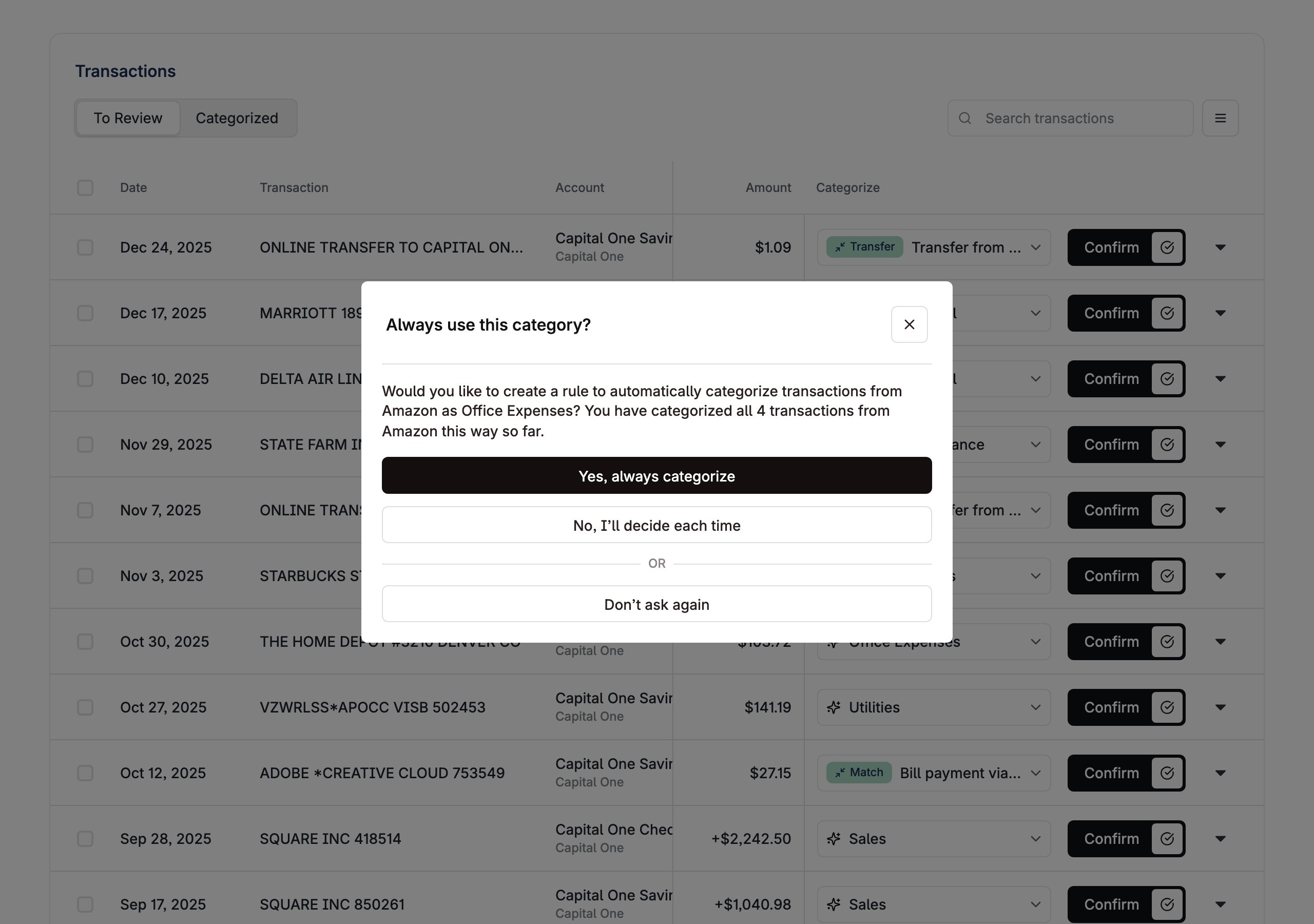
Rule lifecycle paths
Each of the four paths below describes a distinct action a user can take on a categorization rule: creating one from a suggestion, rejecting a suggestion, undoing a previous rejection, or archiving a rule that already exists.In the diagrams that follow, Your App refers to either Layer’s embedded components or your own custom integration. The API flow is the same in both cases.
Create a rule from a suggestion
When a user accepts a rule suggestion, submit the prebuiltnew_rule payload to Create Categorization Rule. Layer will persist the rule and apply it to future matching transactions (and retroactively, if apply_retroactively is true).
Reject a rule suggestion
When a user declines a suggestion, call Reject Suggested Categorization Rule with the suggestion id. This dismisses the suggestion so it will not be shown again.Undo a dismissed suggestion
If a user changes their mind after rejecting a suggestion, call Update Suggested Categorization Rule and setdismissed_at to null.
Archive an existing rule
To retire a rule that was previously created, call Archive Categorization Rule with the rule id. Archived rules stop applying to future transactions but remain visible for historical reference.Previewing suggestions
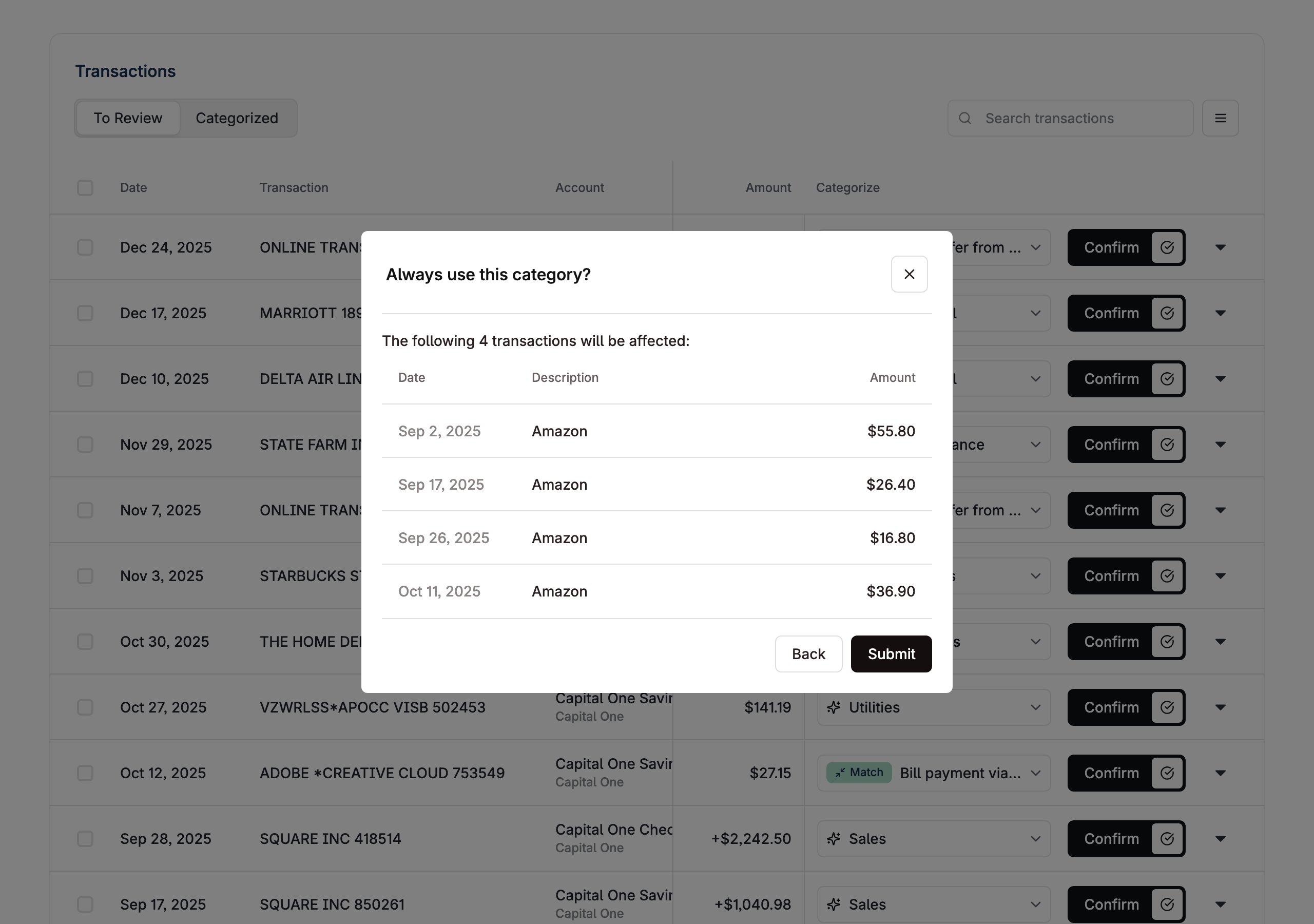
Before a user accepts a rule suggestion, you can show them exactly which transactions will be affected by using the List Suggested Categorization Rules endpoint, withshow_affected_transactions=true.
Use this to:
- Render a confirmation screen listing each impacted transaction (counterparty, amount, date) so the user can review before committing.
- Surface the count of affected transactions as a summary (e.g. “This rule will recategorize 12 existing transactions”).
- Help the user decide whether to accept, decline, or edit the rule before submitting.
apply_retroactively is true on the new_rule payload, these transactions will be recategorized when the rule is created. If false, the rule will only apply to future matching transactions and the preview is informational only.
In the diagram below, Your App refers to either Layer’s embedded components or your own custom integration. The API flow is the same in both cases.
Custom Integration
The guide below is for API consumers building their own transaction categorization UI. If you are using Layer’s Bank Transactions embedded component, you will not need any additional integration to handle rule suggestions.Where suggestions appear
Layer may return a rule suggestion when you categorize transactions through:- Categorize Bank Transaction
- Bulk Categorize Bank Transactions
- Bulk Match or Categorize for entries using a categorize action
update_categorization_rules_suggestion (nullable). If this field is null, there is no suggestion to show.
For the exact response structure, see the update_categorization_rules_suggestion field.
Consumer-facing payload
For end-user integration flows, treat this suggestion as:Create_Categorization_Rule_For_Counterparty
id: stable suggestion idsuggestion_prompt: non-null display text you can show in UI when a suggestion is returnednew_rule: prebuilt rule payload to submittransactions_that_will_be_affected: preview of transactions impacted by the rule
Recommended integration flow
- Categorize a transaction.
- If
update_categorization_rules_suggestionis present, show a prompt in UI. - On accept, follow the Create a rule from a suggestion path.
- On decline, follow the Reject a rule suggestion path.
- If the user wants to reverse a prior decline, follow the Undo a dismissed suggestion path.
- Continue normal categorization workflow regardless of suggestion state.
Example response fragment
FAQ
Why are suggestions not showing up?
For the type of rule you are attempting to create (e.g. Uber expenses to be categorized asTRAVEL_EXPENSE), verify that you do not have a previous
rule suggestion that matches that description that has a dismissed_at field.
If this value is defined, it means the user has been previously suggested and the user rejected and requested that the rule not to be shown again.
Notes
- Categorization Rules Suggestions logic is determined by Layer and may evolve over time. For more details, please reach out to your Layer representative.