> ## Documentation Index
> Fetch the complete documentation index at: https://docs.layerfi.com/llms.txt
> Use this file to discover all available pages before exploring further.
# Rule suggestions
> Automatically categorize future transactions by defining a rule.
A categorization rule is a saved condition (i.e. transaction context details like counterparty, amount, etc.) that automatically categorizes future matching transactions.
## How it works
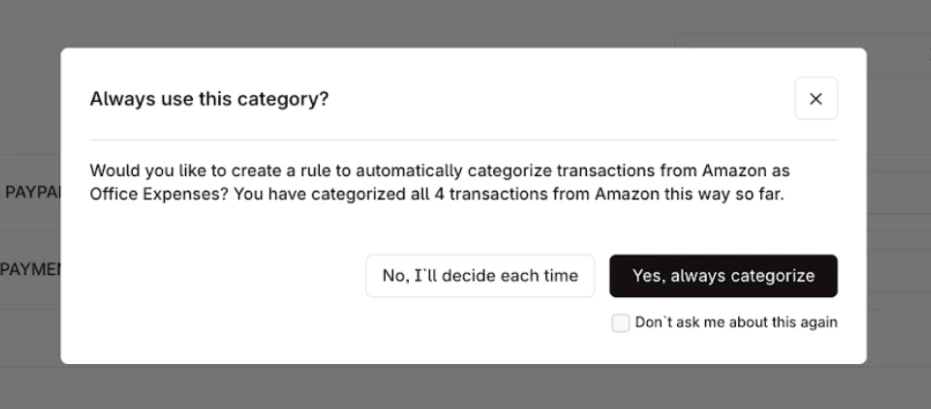
When you categorize a transaction, Layer may recommend creating a rule to automatically categorize future matching transactions. This reduces repetitive manual work, keeps categorization consistent over time, and helps users close their books faster.
*Categorization Rules Suggestion is currently an experimental feature that is not yet available to all customers. Please reach out to your Layer representative to enable this feature.*
If you are using Layer's [Bank Transactions](/embedded-components/components/bank-transactions) embedded component, you will see a prompt in the UI to create a rule.
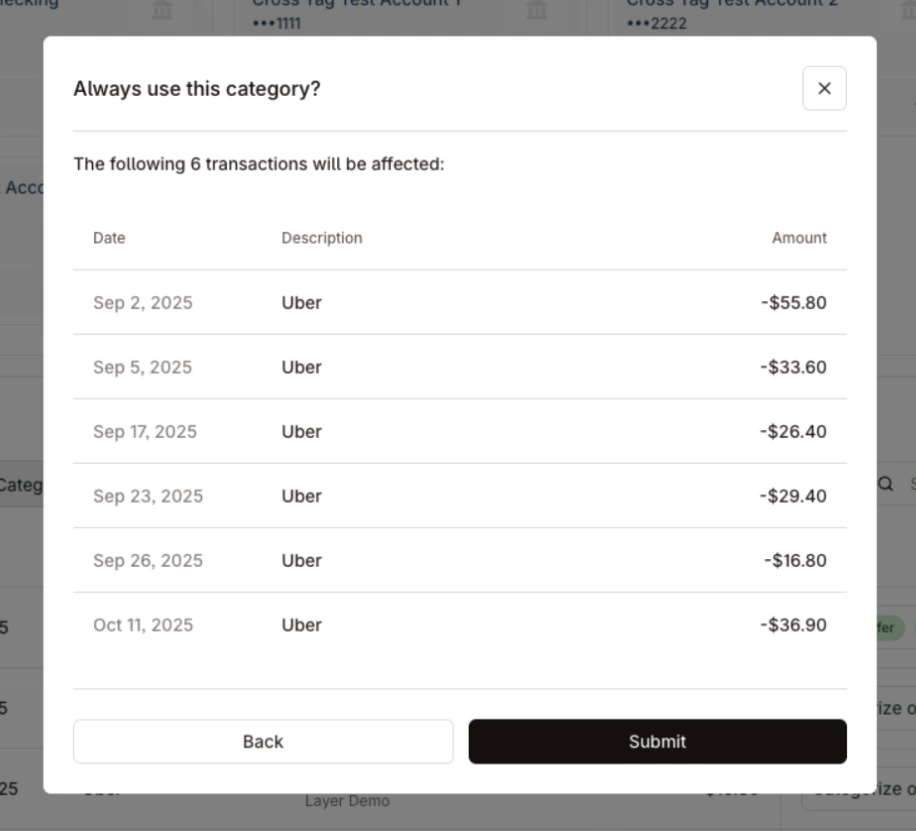
 If the user chooses to accept the rule, they will be presented with a preview of the transactions that will be affected by the rule.
 ## Rule lifecycle paths
Each of the four paths below describes a distinct action a user can take on a categorization rule: creating one from a suggestion, rejecting a suggestion, undoing a previous rejection, or archiving a rule that already exists.
In the diagrams that follow, **Your App** refers to either Layer's [embedded components](/embedded-components/components/bank-transactions) or your own [custom integration](#custom-integration). The API flow is the same in both cases.
### Create a rule from a suggestion
When a user accepts a rule suggestion, submit the prebuilt `new_rule` payload to [Create Categorization Rule](/api-reference/v1/categorization-rules/create-categorization-rule). Layer will persist the rule and apply it to future matching transactions (and retroactively, if `apply_retroactively` is `true`).
```mermaid theme={null}
sequenceDiagram
participant User
participant App as Your App
participant Layer as Layer API
User->>App: Categorize transaction
App->>Layer: PUT /v1/businesses/{businessId}/bank-transactions/{transactionId}/categorize
Layer-->>App: Bank_Transaction + update_categorization_rules_suggestion
App->>User: Show rule suggestion prompt
User->>App: Accept
App->>Layer: POST /v1/businesses/{businessId}/categorization-rules
Layer-->>App: Categorization_Rule (created)
App->>User: Confirm rule created
```
### Reject a rule suggestion
When a user declines a suggestion, call [Reject Suggested Categorization Rule](/api-reference/v1/categorization-rules/reject-suggested-categorization-rule) with the suggestion id. This dismisses the suggestion so it will not be shown again.
```mermaid theme={null}
sequenceDiagram
participant User
participant App as Your App
participant Layer as Layer API
User->>App: Categorize transaction
App->>Layer: PUT /v1/businesses/{businessId}/bank-transactions/{transactionId}/categorize
Layer-->>App: Bank_Transaction + update_categorization_rules_suggestion
App->>User: Show rule suggestion prompt
User->>App: Decline
App->>Layer: DELETE /v1/businesses/{businessId}/categorization-rules/suggestions/{suggestionId}
Layer-->>App: Suggestion dismissed
App->>User: Return to normal categorization flow
```
### Undo a dismissed suggestion
If a user changes their mind after rejecting a suggestion, call [Update Suggested Categorization Rule](/api-reference/v1/categorization-rules/update-suggested-categorization-rule) and set `dismissed_at` to `null`.
```mermaid theme={null}
sequenceDiagram
participant User
participant App as Your App
participant Layer as Layer API
User->>App: Re-enable a previously dismissed suggestion
App->>Layer: PATCH /v1/businesses/{businessId}/categorization-rules/suggestions/{suggestionId}
Note right of App: body: { "dismissed_at": null }
Layer-->>App: Suggestion updated (status returns to PENDING)
App->>User: Suggestion can be shown again
```
### Archive an existing rule
To retire a rule that was previously created, call [Archive Categorization Rule](/api-reference/v1/categorization-rules/archive-categorization-rule) with the rule id. Archived rules stop applying to future transactions but remain visible for historical reference.
```mermaid theme={null}
sequenceDiagram
participant User
participant App as Your App
participant Layer as Layer API
User->>App: Open rule management UI
App->>Layer: GET /v1/businesses/{businessId}/categorization-rules
Layer-->>App: List of active rules
User->>App: Archive rule
App->>Layer: POST /v1/businesses/{businessId}/categorization-rules/{id}/archive
Layer-->>App: Categorization_Rule (archived_at set)
App->>User: Rule no longer applies to future transactions
```
## Previewing suggestions
Before a user accepts a rule suggestion, you can show them exactly which transactions will be affected by using the [List Suggested Categorization Rules](/api-reference/v1/categorization-rules/list-suggested-categorization-rules) endpoint, with `show_affected_transactions=true`.
Use this to:
* Render a confirmation screen listing each impacted transaction (counterparty, amount, date) so the user can review before committing.
* Surface the count of affected transactions as a summary (e.g. "This rule will recategorize 12 existing transactions").
* Help the user decide whether to accept, decline, or edit the rule before submitting.
If `apply_retroactively` is `true` on the `new_rule` payload, these transactions will be recategorized when the rule is created. If `false`, the rule will only apply to future matching transactions and the preview is informational only.
In the diagram below, **Your App** refers to either Layer's [embedded components](/embedded-components/components/bank-transactions) or your own [custom integration](#custom-integration). The API flow is the same in both cases.
```mermaid theme={null}
sequenceDiagram
participant User
participant App as Your App
participant Layer as Layer API
User->>App: Request rule suggestions with preview
App->>Layer: GET /v1/businesses/{businessId}/categorization-rules/suggestions?show_affected_transactions=true
Layer-->>App: Suggestions + transactions_that_will_be_affected
App->>User: Render impacted transactions
User->>App: Accept or decline
```
## Custom Integration
The guide below is for API consumers building their own transaction categorization UI.
If you are using Layer's [Bank Transactions](/embedded-components/components/bank-transactions) embedded component, you will not need any additional integration to handle rule suggestions.
### Where suggestions appear
Layer may return a rule suggestion when you categorize transactions through:
* [Categorize Bank Transaction](/api-reference/v1/categorize-bank-transaction)
* [Bulk Categorize Bank Transactions](/api-reference/v1/bulk-categorize-bank-transactions)
* [Bulk Match or Categorize](/api-reference/v1/bulk-match-or-categorize) for entries using a categorize action
These endpoints return [Bank Transactions](/api-reference/bank-transaction/bank-transaction) objects with
the additional field for `update_categorization_rules_suggestion` (nullable). If this field is `null`, there is no suggestion to show.
For the exact response structure, see the [update\_categorization\_rules\_suggestion](/api-reference/v1/categorize-bank-transaction#response-update-categorization-rules-suggestion) field.
### Consumer-facing payload
For end-user integration flows, treat this suggestion as:
* `Create_Categorization_Rule_For_Counterparty`
Common fields you should use:
* `id`: stable suggestion id
* `suggestion_prompt`: non-null display text you can show in UI when a suggestion is returned
* `new_rule`: prebuilt rule payload to submit
* `transactions_that_will_be_affected`: preview of transactions impacted by the rule
### Recommended integration flow
1. Categorize a transaction.
2. If `update_categorization_rules_suggestion` is present, show a prompt in UI.
3. On **accept**, follow the [Create a rule from a suggestion](#create-a-rule-from-a-suggestion) path.
4. On **decline**, follow the [Reject a rule suggestion](#reject-a-rule-suggestion) path.
5. If the user wants to reverse a prior decline, follow the [Undo a dismissed suggestion](#undo-a-dismissed-suggestion) path.
6. Continue normal categorization workflow regardless of suggestion state.
### Example response fragment
```json theme={null}
{
"type": "Bank_Transaction",
"id": "5e1f58e6-0f9c-49ec-ae0f-3d7a67a8f70c",
"categorization_status": "CATEGORIZED",
"update_categorization_rules_suggestion": {
"type": "Create_Categorization_Rule_For_Counterparty",
"id": "b3488b6a-c7b4-4d2a-a8c7-7d15f9942ed4",
"suggestion_prompt": "Would you like to create a rule to automatically categorize outbound transactions from Acme as Office Expenses?",
"new_rule": {
"apply_retroactively": true,
"created_by_suggestion_id": "b3488b6a-c7b4-4d2a-a8c7-7d15f9942ed4",
"counterparty_filter": "f1664961-43d8-42f1-9a6d-c6c32a9f0adf",
"category": {
"type": "StableName",
"stable_name": "OFFICE_EXPENSES"
},
"bank_direction_filter": "MONEY_OUT"
},
"transactions_that_will_be_affected": []
}
}
```
## FAQ
### Why are suggestions not showing up?
For the type of rule you are attempting to create (e.g. Uber expenses to be categorized as `TRAVEL_EXPENSE`), verify that you do not have a previous
rule suggestion that matches that description that has a [dismissed\_at](/api-reference/v1/categorization-rules/list-suggested-categorization-rules#response-data-items-one-of-0-dismissed-at-one-of-0) field.
If this value is defined, it means the user has been previously suggested and the user rejected and requested that the rule not to be shown again.
## Notes
* Categorization Rules Suggestions logic is determined by Layer and may evolve over time. For more details, please reach out to your Layer representative.
## Rule lifecycle paths
Each of the four paths below describes a distinct action a user can take on a categorization rule: creating one from a suggestion, rejecting a suggestion, undoing a previous rejection, or archiving a rule that already exists.
In the diagrams that follow, **Your App** refers to either Layer's [embedded components](/embedded-components/components/bank-transactions) or your own [custom integration](#custom-integration). The API flow is the same in both cases.
### Create a rule from a suggestion
When a user accepts a rule suggestion, submit the prebuilt `new_rule` payload to [Create Categorization Rule](/api-reference/v1/categorization-rules/create-categorization-rule). Layer will persist the rule and apply it to future matching transactions (and retroactively, if `apply_retroactively` is `true`).
```mermaid theme={null}
sequenceDiagram
participant User
participant App as Your App
participant Layer as Layer API
User->>App: Categorize transaction
App->>Layer: PUT /v1/businesses/{businessId}/bank-transactions/{transactionId}/categorize
Layer-->>App: Bank_Transaction + update_categorization_rules_suggestion
App->>User: Show rule suggestion prompt
User->>App: Accept
App->>Layer: POST /v1/businesses/{businessId}/categorization-rules
Layer-->>App: Categorization_Rule (created)
App->>User: Confirm rule created
```
### Reject a rule suggestion
When a user declines a suggestion, call [Reject Suggested Categorization Rule](/api-reference/v1/categorization-rules/reject-suggested-categorization-rule) with the suggestion id. This dismisses the suggestion so it will not be shown again.
```mermaid theme={null}
sequenceDiagram
participant User
participant App as Your App
participant Layer as Layer API
User->>App: Categorize transaction
App->>Layer: PUT /v1/businesses/{businessId}/bank-transactions/{transactionId}/categorize
Layer-->>App: Bank_Transaction + update_categorization_rules_suggestion
App->>User: Show rule suggestion prompt
User->>App: Decline
App->>Layer: DELETE /v1/businesses/{businessId}/categorization-rules/suggestions/{suggestionId}
Layer-->>App: Suggestion dismissed
App->>User: Return to normal categorization flow
```
### Undo a dismissed suggestion
If a user changes their mind after rejecting a suggestion, call [Update Suggested Categorization Rule](/api-reference/v1/categorization-rules/update-suggested-categorization-rule) and set `dismissed_at` to `null`.
```mermaid theme={null}
sequenceDiagram
participant User
participant App as Your App
participant Layer as Layer API
User->>App: Re-enable a previously dismissed suggestion
App->>Layer: PATCH /v1/businesses/{businessId}/categorization-rules/suggestions/{suggestionId}
Note right of App: body: { "dismissed_at": null }
Layer-->>App: Suggestion updated (status returns to PENDING)
App->>User: Suggestion can be shown again
```
### Archive an existing rule
To retire a rule that was previously created, call [Archive Categorization Rule](/api-reference/v1/categorization-rules/archive-categorization-rule) with the rule id. Archived rules stop applying to future transactions but remain visible for historical reference.
```mermaid theme={null}
sequenceDiagram
participant User
participant App as Your App
participant Layer as Layer API
User->>App: Open rule management UI
App->>Layer: GET /v1/businesses/{businessId}/categorization-rules
Layer-->>App: List of active rules
User->>App: Archive rule
App->>Layer: POST /v1/businesses/{businessId}/categorization-rules/{id}/archive
Layer-->>App: Categorization_Rule (archived_at set)
App->>User: Rule no longer applies to future transactions
```
## Previewing suggestions
Before a user accepts a rule suggestion, you can show them exactly which transactions will be affected by using the [List Suggested Categorization Rules](/api-reference/v1/categorization-rules/list-suggested-categorization-rules) endpoint, with `show_affected_transactions=true`.
Use this to:
* Render a confirmation screen listing each impacted transaction (counterparty, amount, date) so the user can review before committing.
* Surface the count of affected transactions as a summary (e.g. "This rule will recategorize 12 existing transactions").
* Help the user decide whether to accept, decline, or edit the rule before submitting.
If `apply_retroactively` is `true` on the `new_rule` payload, these transactions will be recategorized when the rule is created. If `false`, the rule will only apply to future matching transactions and the preview is informational only.
In the diagram below, **Your App** refers to either Layer's [embedded components](/embedded-components/components/bank-transactions) or your own [custom integration](#custom-integration). The API flow is the same in both cases.
```mermaid theme={null}
sequenceDiagram
participant User
participant App as Your App
participant Layer as Layer API
User->>App: Request rule suggestions with preview
App->>Layer: GET /v1/businesses/{businessId}/categorization-rules/suggestions?show_affected_transactions=true
Layer-->>App: Suggestions + transactions_that_will_be_affected
App->>User: Render impacted transactions
User->>App: Accept or decline
```
## Custom Integration
The guide below is for API consumers building their own transaction categorization UI.
If you are using Layer's [Bank Transactions](/embedded-components/components/bank-transactions) embedded component, you will not need any additional integration to handle rule suggestions.
### Where suggestions appear
Layer may return a rule suggestion when you categorize transactions through:
* [Categorize Bank Transaction](/api-reference/v1/categorize-bank-transaction)
* [Bulk Categorize Bank Transactions](/api-reference/v1/bulk-categorize-bank-transactions)
* [Bulk Match or Categorize](/api-reference/v1/bulk-match-or-categorize) for entries using a categorize action
These endpoints return [Bank Transactions](/api-reference/bank-transaction/bank-transaction) objects with
the additional field for `update_categorization_rules_suggestion` (nullable). If this field is `null`, there is no suggestion to show.
For the exact response structure, see the [update\_categorization\_rules\_suggestion](/api-reference/v1/categorize-bank-transaction#response-update-categorization-rules-suggestion) field.
### Consumer-facing payload
For end-user integration flows, treat this suggestion as:
* `Create_Categorization_Rule_For_Counterparty`
Common fields you should use:
* `id`: stable suggestion id
* `suggestion_prompt`: non-null display text you can show in UI when a suggestion is returned
* `new_rule`: prebuilt rule payload to submit
* `transactions_that_will_be_affected`: preview of transactions impacted by the rule
### Recommended integration flow
1. Categorize a transaction.
2. If `update_categorization_rules_suggestion` is present, show a prompt in UI.
3. On **accept**, follow the [Create a rule from a suggestion](#create-a-rule-from-a-suggestion) path.
4. On **decline**, follow the [Reject a rule suggestion](#reject-a-rule-suggestion) path.
5. If the user wants to reverse a prior decline, follow the [Undo a dismissed suggestion](#undo-a-dismissed-suggestion) path.
6. Continue normal categorization workflow regardless of suggestion state.
### Example response fragment
```json theme={null}
{
"type": "Bank_Transaction",
"id": "5e1f58e6-0f9c-49ec-ae0f-3d7a67a8f70c",
"categorization_status": "CATEGORIZED",
"update_categorization_rules_suggestion": {
"type": "Create_Categorization_Rule_For_Counterparty",
"id": "b3488b6a-c7b4-4d2a-a8c7-7d15f9942ed4",
"suggestion_prompt": "Would you like to create a rule to automatically categorize outbound transactions from Acme as Office Expenses?",
"new_rule": {
"apply_retroactively": true,
"created_by_suggestion_id": "b3488b6a-c7b4-4d2a-a8c7-7d15f9942ed4",
"counterparty_filter": "f1664961-43d8-42f1-9a6d-c6c32a9f0adf",
"category": {
"type": "StableName",
"stable_name": "OFFICE_EXPENSES"
},
"bank_direction_filter": "MONEY_OUT"
},
"transactions_that_will_be_affected": []
}
}
```
## FAQ
### Why are suggestions not showing up?
For the type of rule you are attempting to create (e.g. Uber expenses to be categorized as `TRAVEL_EXPENSE`), verify that you do not have a previous
rule suggestion that matches that description that has a [dismissed\_at](/api-reference/v1/categorization-rules/list-suggested-categorization-rules#response-data-items-one-of-0-dismissed-at-one-of-0) field.
If this value is defined, it means the user has been previously suggested and the user rejected and requested that the rule not to be shown again.
## Notes
* Categorization Rules Suggestions logic is determined by Layer and may evolve over time. For more details, please reach out to your Layer representative.