> ## Documentation Index
> Fetch the complete documentation index at: https://docs.layerfi.com/llms.txt
> Use this file to discover all available pages before exploring further.
# Accounting reports
Layer provides a full set of accounting charts and table reports that you can embed directly within your platform. You can use these reports to give your customers a clear picture of their business profitability, cash flows, and balance sheet.
There are two ways to offer reporting within your platform:
* **Embedded UI components** - Embed Layer's charts and report UI components within your experience.
* **API** - Call Layer's API directly to build your own accounting reports.
## Embedded components
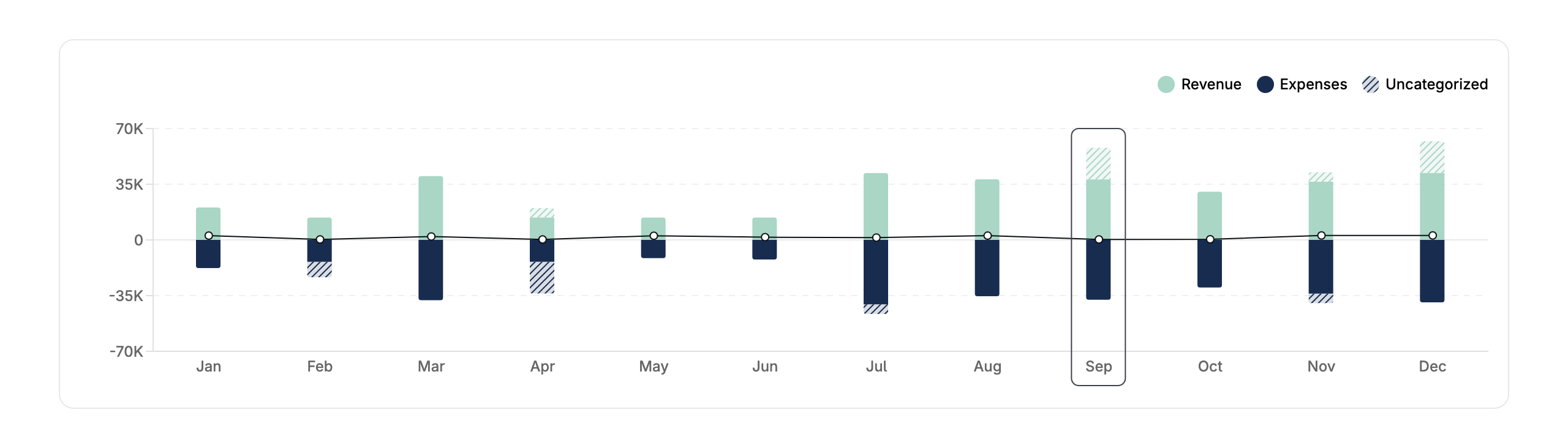
Layer provides a variety of chart and table report UI components that you can download via npm and embed directly within your frontend. Below are some examples:
**Profit & Loss chart**
 **Profit & Loss table**
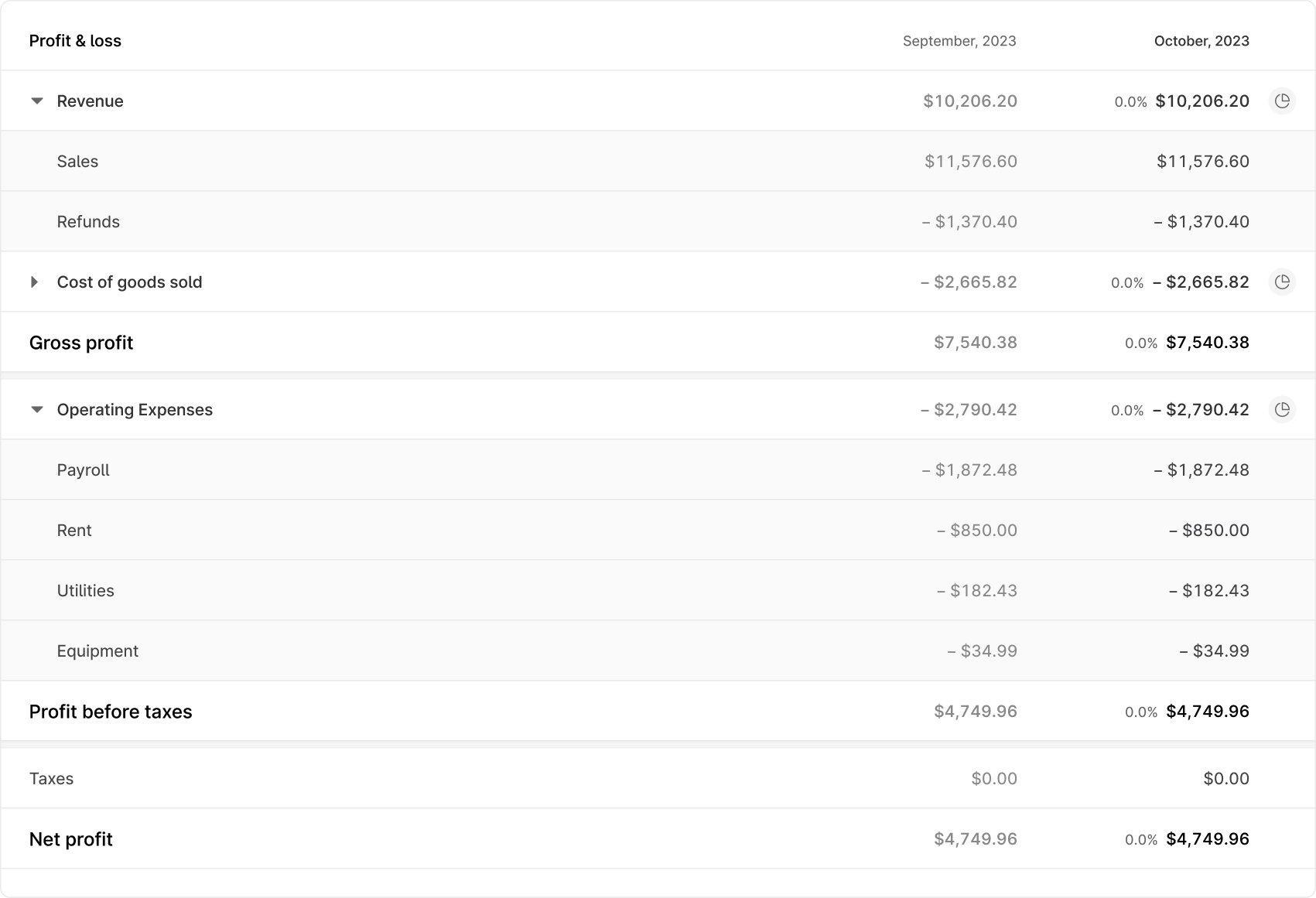 More detail on using Layer's embedded UI components is available [here](/guides/embedded-components). Reach out to your Layer contact for a full list of embedded reporting components.
## API
### Retrieving a Profit & Loss report
To build your own Profit & Loss report UI make a call to the [retrieve a Profit and Loss Report](/api-reference/pnl/get) endpoint.
The start\_date query string parameter is required for all calls to the Retrieve a Profit and Loss Report endpoint.
```bash Request theme={null}
curl -X GET https://sandbox.layerfi.com/v1/businesses/{business_id}/reports/profit-and-loss?start_date=2023-01-01T00:00:00-06:00&end_date=2023-12-01T00:00:00-06:00
-H "Authorization: Bearer "
```
The API will respond with the generated \[Profit and Loss Report]\(/api-reference/pnl/pnl.
```json Response theme={null}
{
"data":{
"type":"Profit_And_Loss",
"business_id":"d2f6d97f-3345-4299-9ec2-468738c5d536",
"start_date":"2023-01-01T06:00:00Z",
"end_date":"2023-12-01T06:00:00Z",
"income":{
"name":"REVENUE",
"display_name":"Revenue",
"value":49397,
"line_items":[
{
"name":"SERVICES_REVENUE",
"display_name":"Service Revenue",
"value":46897,
"line_items":null
},
{
"name":"GOODS_REVENUE",
"display_name":"Sale of Goods Revenue",
"value":0,
"line_items":null
},
{
"name":"DISCOUNTS",
"display_name":"Discounts & Refunds",
"value":2500,
"line_items":null
}
]
},
"cost_of_goods_sold":{
"name":"COGS",
"display_name":"Cost of Goods Sold",
"value":8026,
"line_items":[
{
"name":"JOB_SUPPLIES",
"display_name":"Job supplies",
"value":8026,
"line_items":null
}
]
},
"gross_profit":41371,
"expenses":{
"name":"OPERATING_EXPENSES",
"display_name":"Operating Expenses",
"value":0,
"line_items":[
{
"name":"INSURANCE",
"display_name":"Insurance",
"value":0,
"line_items":null
},
{
"name":"RENT_EXPENSE",
"display_name":"Rent",
"value":0,
"line_items":null
},
{
"name":"UTILITIES",
"display_name":"Utilities",
"value":0,
"line_items":null
},
{
"name":"EQUIPMENT",
"display_name":"Equipment & Tools",
"value":0,
"line_items":null
},
{
"name":"ADVERTISING",
"display_name":"Advertising",
"value":0,
"line_items":null
},
{
"name":"VEHICLE_EXPENSES",
"display_name":"Vehicle Expenses",
"value":0,
"line_items":null
}
]
},
"profit_before_taxes":41371,
"taxes":{
"name":"TAXES",
"display_name":"Taxes",
"value":0,
"line_items":null
},
"net_profit":41371,
"other_outflows":null,
"personal_expenses":null,
"fully_categorized":true
}
}
```
You can use this data to build your own profit and loss report UI within your platform.
### Supported reports
A full list of supported reports is available in the [API reference](/api-reference/pnl/pnl).
### Async report exports
Some reports are generated asynchronously. Submit a request, poll (or wait for a webhook), then download the file. See [Generating async reports](/guides/async-reports).
### Bookkeeping status reporting
For analytics and support visibility into books status across your platform, use the [bookkeeping status reporting](/api-reference/v1/list-bookkeeping-businesses) endpoints to list enrolled businesses, fetch a business status summary, and retrieve period history.
More detail on using Layer's embedded UI components is available [here](/guides/embedded-components). Reach out to your Layer contact for a full list of embedded reporting components.
## API
### Retrieving a Profit & Loss report
To build your own Profit & Loss report UI make a call to the [retrieve a Profit and Loss Report](/api-reference/pnl/get) endpoint.
The start\_date query string parameter is required for all calls to the Retrieve a Profit and Loss Report endpoint.
```bash Request theme={null}
curl -X GET https://sandbox.layerfi.com/v1/businesses/{business_id}/reports/profit-and-loss?start_date=2023-01-01T00:00:00-06:00&end_date=2023-12-01T00:00:00-06:00
-H "Authorization: Bearer "
```
The API will respond with the generated \[Profit and Loss Report]\(/api-reference/pnl/pnl.
```json Response theme={null}
{
"data":{
"type":"Profit_And_Loss",
"business_id":"d2f6d97f-3345-4299-9ec2-468738c5d536",
"start_date":"2023-01-01T06:00:00Z",
"end_date":"2023-12-01T06:00:00Z",
"income":{
"name":"REVENUE",
"display_name":"Revenue",
"value":49397,
"line_items":[
{
"name":"SERVICES_REVENUE",
"display_name":"Service Revenue",
"value":46897,
"line_items":null
},
{
"name":"GOODS_REVENUE",
"display_name":"Sale of Goods Revenue",
"value":0,
"line_items":null
},
{
"name":"DISCOUNTS",
"display_name":"Discounts & Refunds",
"value":2500,
"line_items":null
}
]
},
"cost_of_goods_sold":{
"name":"COGS",
"display_name":"Cost of Goods Sold",
"value":8026,
"line_items":[
{
"name":"JOB_SUPPLIES",
"display_name":"Job supplies",
"value":8026,
"line_items":null
}
]
},
"gross_profit":41371,
"expenses":{
"name":"OPERATING_EXPENSES",
"display_name":"Operating Expenses",
"value":0,
"line_items":[
{
"name":"INSURANCE",
"display_name":"Insurance",
"value":0,
"line_items":null
},
{
"name":"RENT_EXPENSE",
"display_name":"Rent",
"value":0,
"line_items":null
},
{
"name":"UTILITIES",
"display_name":"Utilities",
"value":0,
"line_items":null
},
{
"name":"EQUIPMENT",
"display_name":"Equipment & Tools",
"value":0,
"line_items":null
},
{
"name":"ADVERTISING",
"display_name":"Advertising",
"value":0,
"line_items":null
},
{
"name":"VEHICLE_EXPENSES",
"display_name":"Vehicle Expenses",
"value":0,
"line_items":null
}
]
},
"profit_before_taxes":41371,
"taxes":{
"name":"TAXES",
"display_name":"Taxes",
"value":0,
"line_items":null
},
"net_profit":41371,
"other_outflows":null,
"personal_expenses":null,
"fully_categorized":true
}
}
```
You can use this data to build your own profit and loss report UI within your platform.
### Supported reports
A full list of supported reports is available in the [API reference](/api-reference/pnl/pnl).
### Async report exports
Some reports are generated asynchronously. Submit a request, poll (or wait for a webhook), then download the file. See [Generating async reports](/guides/async-reports).
### Bookkeeping status reporting
For analytics and support visibility into books status across your platform, use the [bookkeeping status reporting](/api-reference/v1/list-bookkeeping-businesses) endpoints to list enrolled businesses, fetch a business status summary, and retrieve period history.