> ## Documentation Index
> Fetch the complete documentation index at: https://docs.layerfi.com/llms.txt
> Use this file to discover all available pages before exploring further.
# Bank Accounts and Transactions
> Bank Accounts and Transactions Page.
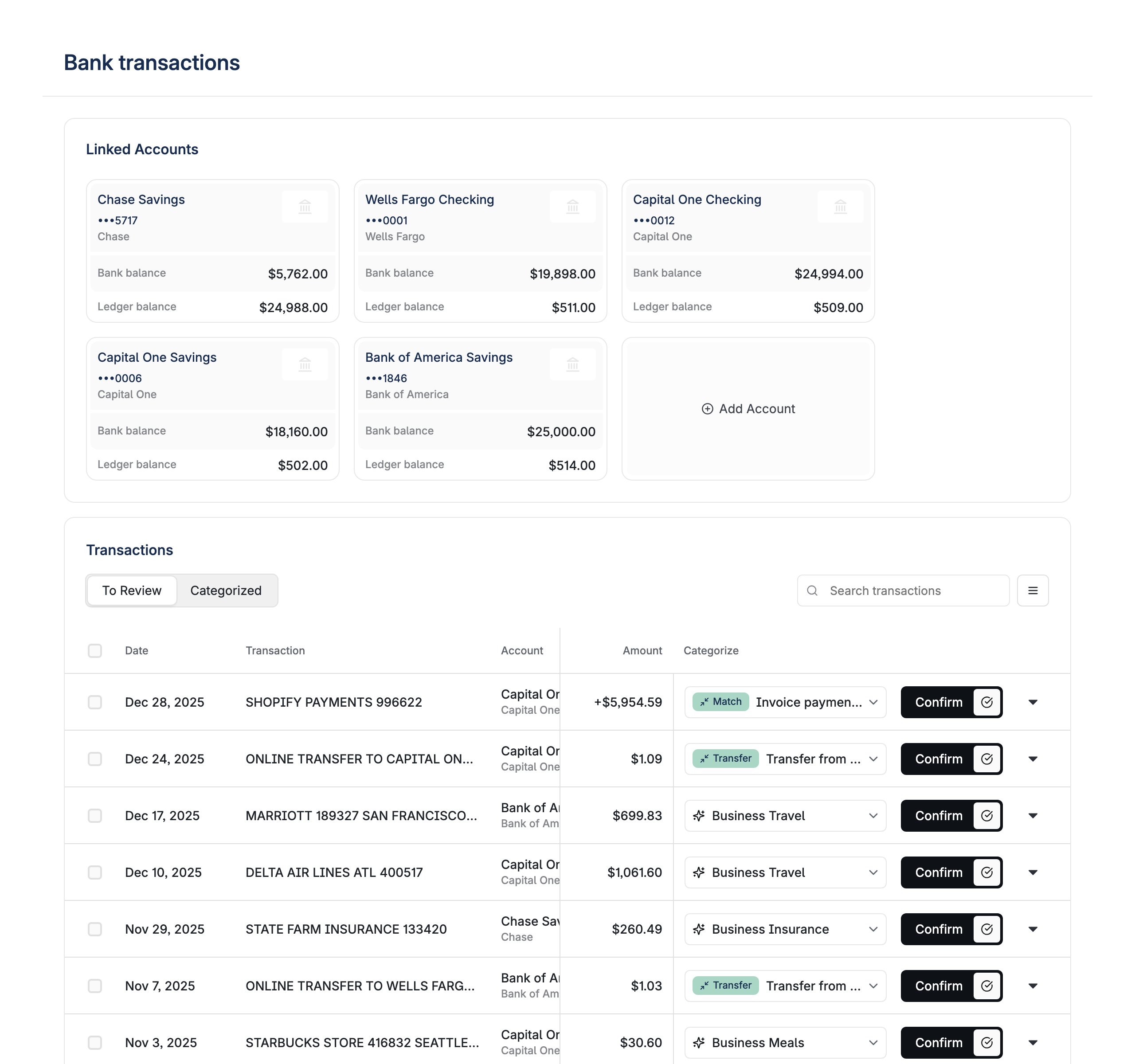
Manage transactions and accounts in one page. This view simply groups together the accounts management and the transaction categorization list so they can be managed together.
 ```tsx theme={null}
import { BankTransactionsWithLinkedAccounts } from '@layerfi/components'
```
### Properties
Controls whether the page title/header is displayed.
Controls whether transaction descriptions are displayed in the transaction list.
Controls whether receipt upload functionality is available for transactions.
Controls whether tooltips are displayed to provide additional information about transactions and categorization.
Controls whether transaction tags are displayed and can be managed in the transaction list.
Controls whether the unlink option is available for linked accounts.
Controls whether upload options are displayed for transactions.
`mobileList` will use the mobile list view for transactions, while `regularList` will use the regular list view.
See the [Bank Transactions](/embedded-components/components/bank-transactions) component for more information on this view.
Flag indicating whether to show the ledger balance corresponding to each linked account in the linked account card.
This can be useful for users who want to reconcile ledger balances with their bank statements.
Flag to enable or hide the customer/vendor column in the transactions table.
Applies elevated styling to the `` component.
Shows the break-connection option in linked accounts, allowing users to disconnect accounts.
Controls whether categorization rule suggestions are shown for bank transactions.
Custom function for rendering in-app navigation links. Receives LinkingMetadata as a parameter and should return a ReactNode. See the [In-App Linking](/embedded-components/linking) guide for details.
Overrides for default strings in the component.
Override for the page title. Defaults to "Bank transactions".
String overrides for the linked accounts section.
Override for the linked accounts section title.
String overrides for the bank transactions section. See BankTransactions component documentation for available options.
Configuration for using Plaid Hosted Link instead of the embedded Plaid modal. When provided, account linking and repair flows open a Plaid-owned page in the browser rather than displaying an embedded modal.
Set to `true` when the user will open the hosted link in an `ASWebAuthenticationSession` (iOS) or Android Custom Tab. This tells Plaid to use the correct redirect handling for mobile contexts.
Universal Link (iOS) or App Link (Android) that opens your app. Used when Plaid redirects from a third-party OAuth app (e.g., a bank's app) back to your app during app-to-app authentication.
URI to redirect to after the user completes the Plaid hosted link flow (e.g., `myapp://plaid-complete`). Recommended for mobile apps to automatically close the hosted link session and return to your app. If not provided, the user sees a "Return to app" message and must navigate back manually.
Callback function that navigates the user to the Plaid Hosted Link URL. This function receives the Plaid-owned URL and should open it in the device's browser or an in-app browser. Required for all hosted link configurations.
```tsx theme={null}
import { BankTransactionsWithLinkedAccounts } from '@layerfi/components'
```
### Properties
Controls whether the page title/header is displayed.
Controls whether transaction descriptions are displayed in the transaction list.
Controls whether receipt upload functionality is available for transactions.
Controls whether tooltips are displayed to provide additional information about transactions and categorization.
Controls whether transaction tags are displayed and can be managed in the transaction list.
Controls whether the unlink option is available for linked accounts.
Controls whether upload options are displayed for transactions.
`mobileList` will use the mobile list view for transactions, while `regularList` will use the regular list view.
See the [Bank Transactions](/embedded-components/components/bank-transactions) component for more information on this view.
Flag indicating whether to show the ledger balance corresponding to each linked account in the linked account card.
This can be useful for users who want to reconcile ledger balances with their bank statements.
Flag to enable or hide the customer/vendor column in the transactions table.
Applies elevated styling to the `` component.
Shows the break-connection option in linked accounts, allowing users to disconnect accounts.
Controls whether categorization rule suggestions are shown for bank transactions.
Custom function for rendering in-app navigation links. Receives LinkingMetadata as a parameter and should return a ReactNode. See the [In-App Linking](/embedded-components/linking) guide for details.
Overrides for default strings in the component.
Override for the page title. Defaults to "Bank transactions".
String overrides for the linked accounts section.
Override for the linked accounts section title.
String overrides for the bank transactions section. See BankTransactions component documentation for available options.
Configuration for using Plaid Hosted Link instead of the embedded Plaid modal. When provided, account linking and repair flows open a Plaid-owned page in the browser rather than displaying an embedded modal.
Set to `true` when the user will open the hosted link in an `ASWebAuthenticationSession` (iOS) or Android Custom Tab. This tells Plaid to use the correct redirect handling for mobile contexts.
Universal Link (iOS) or App Link (Android) that opens your app. Used when Plaid redirects from a third-party OAuth app (e.g., a bank's app) back to your app during app-to-app authentication.
URI to redirect to after the user completes the Plaid hosted link flow (e.g., `myapp://plaid-complete`). Recommended for mobile apps to automatically close the hosted link session and return to your app. If not provided, the user sees a "Return to app" message and must navigate back manually.
Callback function that navigates the user to the Plaid Hosted Link URL. This function receives the Plaid-owned URL and should open it in the device's browser or an in-app browser. Required for all hosted link configurations.