> ## Documentation Index
> Fetch the complete documentation index at: https://docs.layerfi.com/llms.txt
> Use this file to discover all available pages before exploring further.
# Invoices
> Invoice management with creation, editing, payment tracking, and status management.
The Invoices component handles the invoice lifecycle from creation to payment. It includes summary statistics, invoice listing, forms for editing, and payment management.
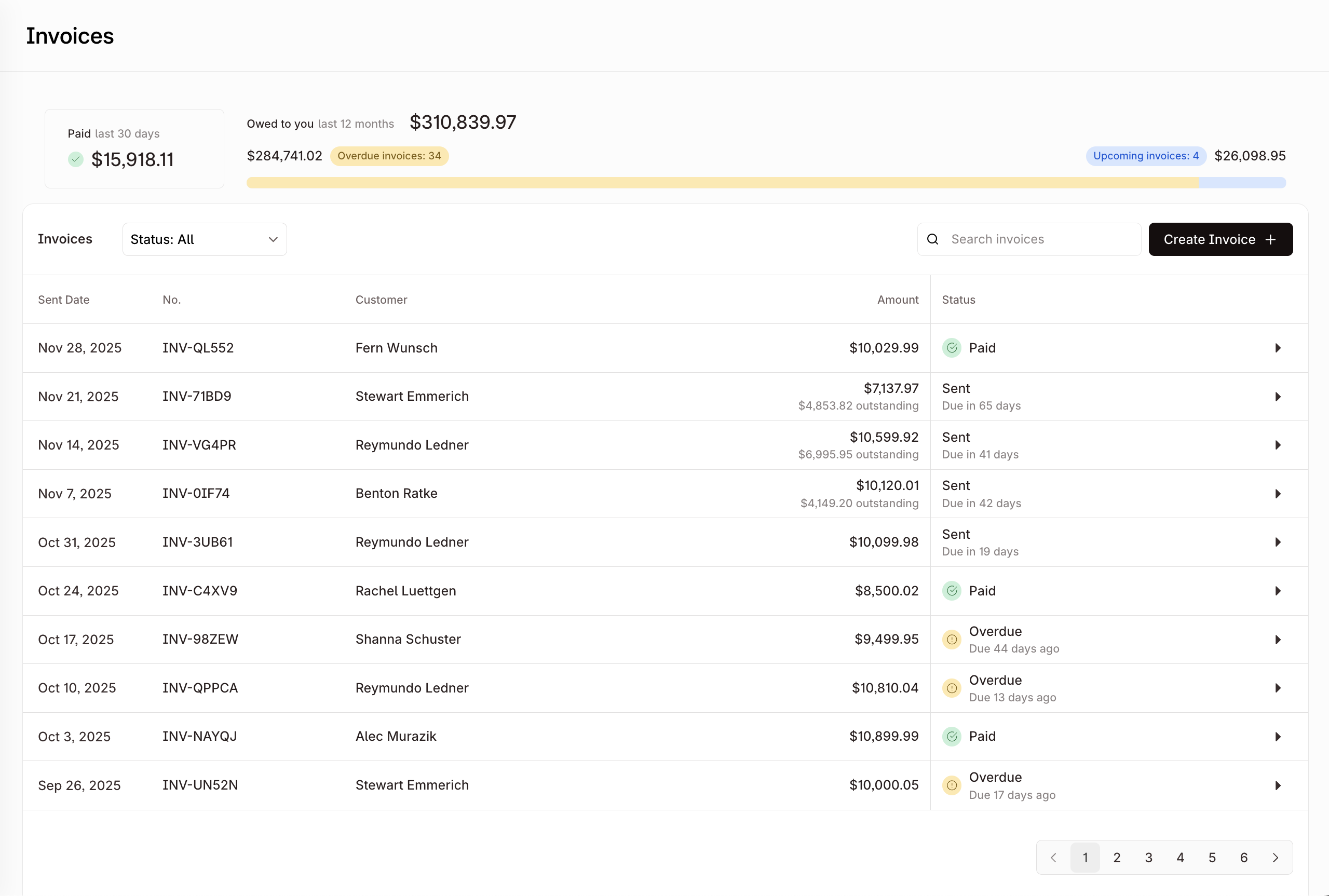
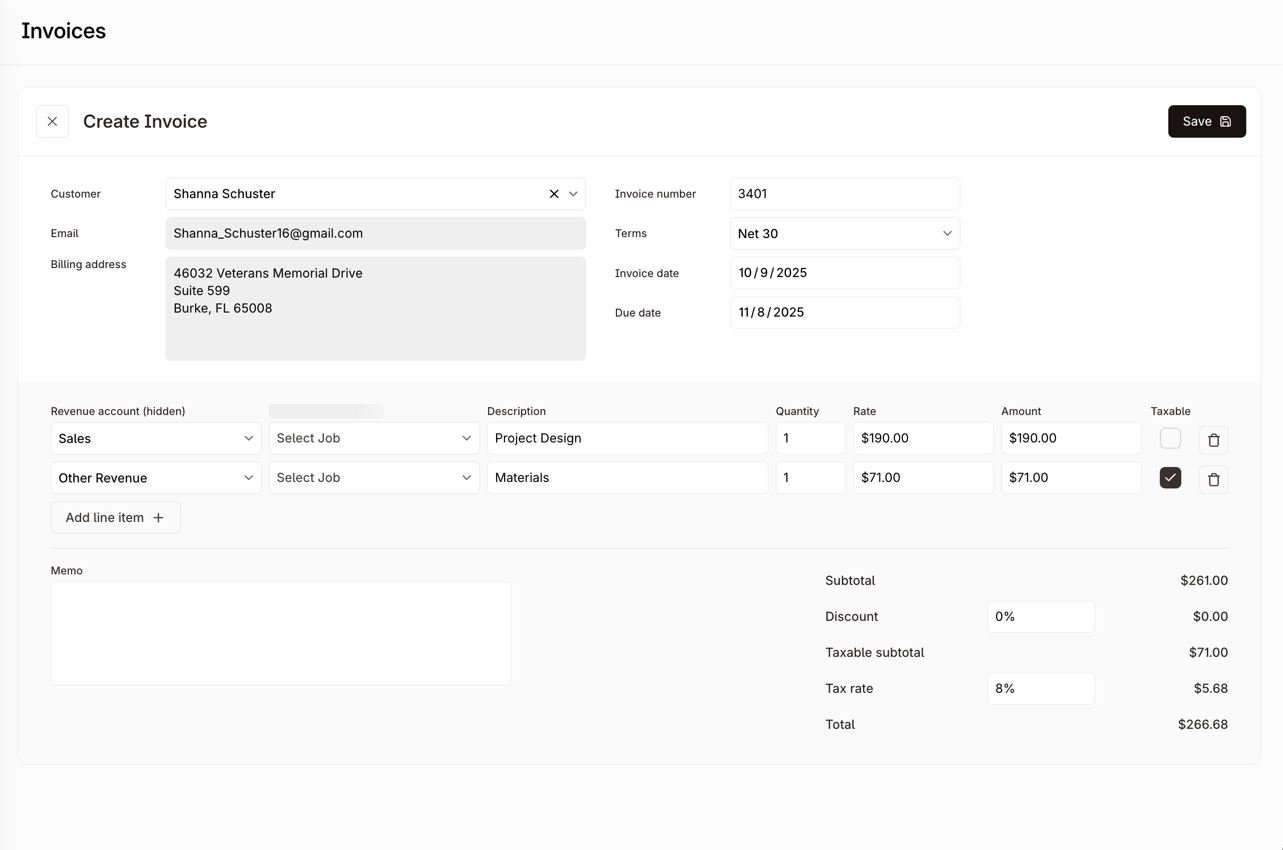
The component switches between an overview mode showing all invoices and a detail mode for creating or editing individual invoices.
```tsx theme={null}
```
## Features
* **Invoice Overview**: Summary statistics for paid amounts, outstanding balances, and overdue invoices
* **Invoice Table**: Paginated table with search, status filtering, and sortable columns
* **Invoice Detail View**: Invoice creation and editing form with line items, customer selection, and payment terms
* **Payment Management**: Record payments, refunds, and view payment history
* **Status Management**: Void, write-off, reset, and send invoices
* **Form Validation**: Inline validation with error messages
* **Customer Integration**: Customer selection and creation within the invoice form
* **Tax Calculations**: Configurable tax rates applied per line item
* **Payment Terms**: Predefined terms (Net 10, 15, 30, 60, 90) or custom due dates
* **Line Item Management**: Add, edit, and remove line items with quantity and unit pricing
* **Status Tracking**: Status indicators for Draft, Sent, Paid, Overdue, Void, and Written-off states
* **Search and Filtering**: Filter invoices by customer, amount, or status
## Usage Examples
**Basic usage:**
```tsx theme={null}
```
**With custom title:**
```tsx theme={null}
```
**With send invoice callback:**
```tsx theme={null}
{
// Custom logic for sending invoice (e.g., email integration)
await sendInvoiceEmail(invoiceId);
}}
/>
```
**Without title header:**
```tsx theme={null}
```
## Properties
Whether to display the page title header. When set to false, the component renders without the top-level title.
Overrides for default strings in the component.
Override for the main component title. Defaults to "Invoices".
Callback function triggered when an invoice is sent. Receives the invoice ID as a parameter and can return a Promise for async operations like email integration.
**Function signature:** `(invoiceId: string) => Promise | void`
### Invoice Overview
The default **view** displays:
* **Summary Statistics**: Paid amounts (last 30 days), outstanding invoices, and overdue amounts
* **Invoice Table**: Columns for invoice number, customer, amount, status, and due date
* **Search and Filtering**: Search by customer name or invoice details, filter by status
* **Create Invoice Button**: Opens the invoice creation form
### Invoice Detail View
Form for creating and editing invoices:
* **Customer Selection**: Customer picker with search and inline creation
* **Invoice Metadata**: Invoice number, sent date, due date, and payment terms
* **Line Items**: Table for adding/editing line items with description, quantity, unit price, and tax
* **Tax Calculations**: Subtotals, taxes, discounts, and totals calculated automatically
* **Payment Terms**: Predefined options (Net 10, 15, 30, 60, 90) or custom date
* **Status Actions**: Send, Void, Write-off, Refund, and Reset actions based on current status
### Payment Management
* **Payment Recording**: Record payments with amount, date, and payment method
* **Payment History**: List of payments and refunds for the invoice
* **Outstanding Balance**: Calculated remaining balance
* **Refund Processing**: Process partial or full refunds
### Status States
* **Draft**: Invoice being created or edited
* **Sent**: Invoice sent to customer, awaiting payment
* **Paid**: Invoice fully paid
* **Overdue**: Sent invoice past due date
* **Void**: Cancelled invoice
* **Written-off**: Invoice marked as uncollectible